
Title search and provider filters in the FLAGMAN Casino game catalogue
The FLAGMAN Casino game catalogue has 13,034 indexed cards in the Polish PLN profile, with separate routes for slots, crash games, live tables and Table Games. Search by full title or narrow the list by provider. Check the mode on the exact card before opening it, since visibility and access can differ. The catalogue scores 7.3/10.
By Rafał Nowakowski · Published


| Parameter | Value |
|---|---|
| Catalogue size | 13,034 indexed game cards and 13,037 IDs in All Games, including 3 collection-only entries |
| Main sections | Lobby, Slots, Live Casino, Crash Games, Table Games and Providers |
| Slots | 7,681 results in the PLN session, with 24 cards in the first group |
| Live games | 1,149 IDs in the Live Games collection and 14 cards in the separate Popular Live Games row |
| Crash and instant | 424 results in the PLN session, with 24 cards in the first group. Aviator and JetX are multiplier games. Chicken Road 2.0, Dice and Mines use other formats. |
| Provider directory | 113 technical entries, with two codes for BGaming |
| Providers to look for | Pragmatic Play, PG Soft, BGaming, Belatra, Hacksaw, Evolution, Pragmatic Play Live, Spribe, Smartsoft and InOut |
| Featured titles | Flagman Fruits by BGaming in Only at FLAGMAN. Mummyland Treasures, Le Pharaoh and Gates of Olympus 1000 in Slots. |
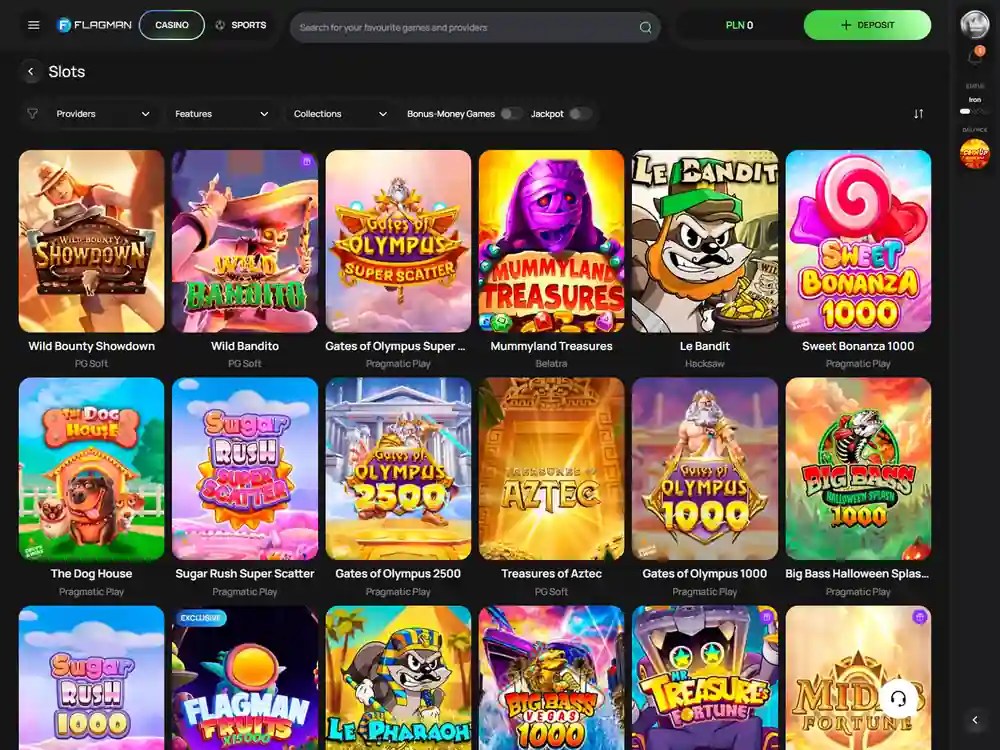
| Search and filters | Global title search and a separate Providers filter for studios. Slots also offers Features, Collections, Bonus-Money Games and Jackpot. |
| Demo tags | Flagman Fruits, Mummyland Treasures, Aviator and JetX are examples with Demo listed. |
| Mobile catalogue | Android APK 1.1 and iOS WebView 7.32 lead into the operator’s catalogue. Availability follows the device, profile and game. |
| Access conditions | Country, currency, device, session and provider rules can affect what appears or opens. |
Pros
- The main tabs give slots, crash games, live dealer games and Table Games separate entrances.
- Slots lets you combine a provider with a feature to narrow the results.
- A full-title search for Flagman Fruits reached the same BGaming card on desktop and Android.
- Favourites kept that card after an account refresh, and Recently Played showed it after a demo launch.
Cons
- Similar titles can point to separate editions, even within one provider’s catalogue.
- Crash Games offers fewer filter types than Slots.
- Counts in the index, collections and visible rows use different units.
- A visible card can still have session or provider restrictions on launch.
Games at FLAGMAN Casino














What the FLAGMAN Casino game catalogue counts
Game IDs, collection totals and visible rows measure different parts of the catalogue. Use the count for the view you are comparing.
The game index and All Games
The index lists 13,034 cards with distinct game IDs. All Games contains those IDs plus three collection-only entries, for 13,037 in total. An ID identifies a catalogue entry. It matters when the same title appears more than once or when a series has several editions.
The operator’s About Us page lists more than 9,000 games and 90 or more providers. Those are the operator’s stated figures. The exact counts here describe the indexed records and named collections for the Polish PLN profile. They answer a different question from how many titles a specific account can open.
What appears on the screen
Slots showed 24 cards in its first group against a session count of 7,681. Crash Games showed 24 against 424. The configuration has a wider scope, with 11,117 IDs in the Slots collection, 11,114 of them matched to a game card, and 505 IDs in the Crash Games collection. Category and feature tags can overlap, so adding those counts would count some titles twice.
Open Casino and go to Lobby if you are still choosing a format. It brings together rows such as Popular, New and Live Games. Open a dedicated tab to browse its own results and controls. For example, Popular Live Games had 14 visible cards, while the Live Games collection contained 1,149 IDs. The row is a starting point for browsing rather than a count of tables open for play.
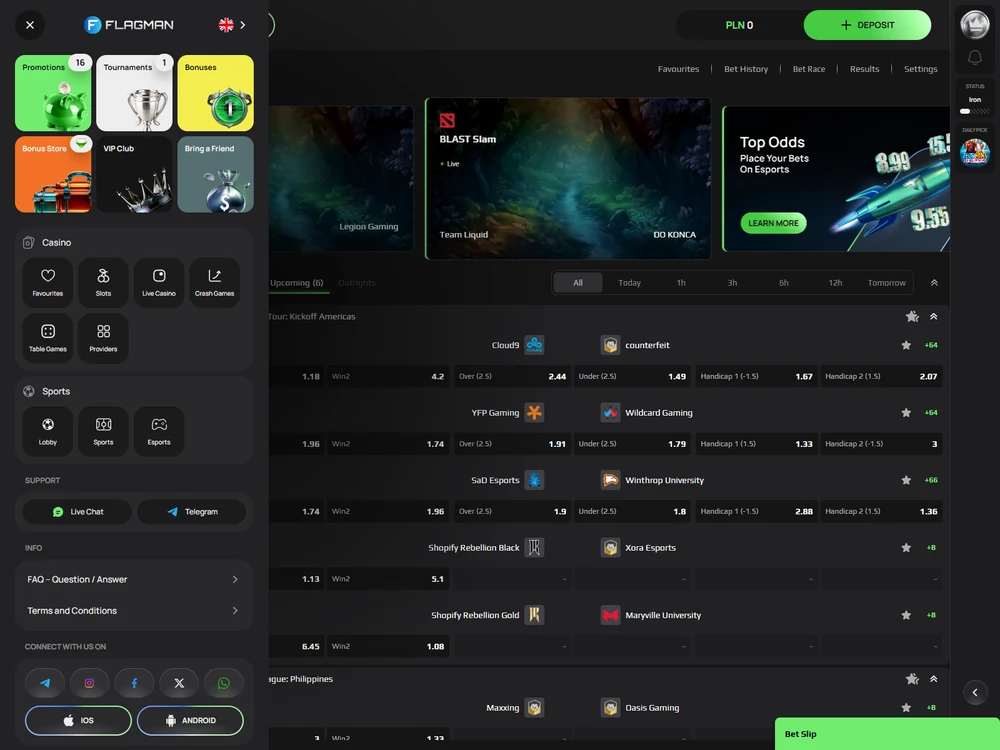
Finding a game by title, provider or collection
Match the title, provider and edition to the game you want. Search narrows by name, while the category and provider controls narrow the starting list.
Search for a title you already know
Here is how to find a game in FLAGMAN Casino when you know its name. Start with the full title, then check that the result matches the edition and studio you intended to open.
- Open Casino and select the global search field.
- Enter the full title, such as Flagman Fruits.
- Check the provider and any suffix or number in the result. Select the matching card and check its available modes before choosing one.
On a Wortmann TERRA AIO 2400 V3 running Windows 11, I reached the BGaming card for Flagman Fruits, ID 482375, in three actions and 6.4 seconds from opening global search in Chrome. The window was 1440 × 900. On Android, I searched for the same title and reached the same card ID. The 6.4 seconds measures the desktop route to the card. The provider’s game screen has its own loading step.
A partial title is useful when you remember only the series. Searching for Gates of Olympus, I found both Gates of Olympus 1000 and Gates of Olympus 2500. I initially selected 2500 when the task was to open 1000, then corrected it by checking the full name. A number in a title can identify a separate result. Keep it in the search when you already know the edition.
Check the provider when the names are identical. The first Crash Games group, for example, included Mines cards from Poggiplay, 100HP Gaming and Hacksaw. The same principle applies when two live studios use a familiar title such as Speed Roulette. Choose the studio on the result card before using a bookmark or returning to a previous game.
Use the controls for the task
Choose the tab for the format you want, then look for the filters available in that tab. The main routes differ in how precisely you can narrow the list before you open a card.
| Route | What to select | What to check |
|---|---|---|
| Lobby | Search or a row such as Popular or New | Full title and provider after opening the result |
| Slots | Providers, Features, Collections, Bonus-Money Games or Jackpot | Which controls are active and whether they leave the card in the results |
| Crash Games | Providers or Jackpot | Studio on the card, especially for titles shared by different providers |
| Live Casino | Live Games, Roulette, Blackjack, Game Show or Poker | Studio, table language, mode and session before opening |
| Table Games | Categories or Providers | The subcategory and the exact card |
| Providers | All Providers or Jackpot Providers | Which provider list is active |
Use these steps to narrow the FLAGMAN Casino game catalogue by studio and feature.
- Open Slots and select Providers.
- Choose BGaming. Open Features and select Buy Casino Bonus to look for cards with that feature.
- Clear the filters when you want the general list again.
For details on individual slot features, see Slots.
In that filter test, BGaming kept Flagman Fruits in the results and removed Belatra’s Mummyland Treasures, ID 11765. Adding Buy Casino Bonus kept the BGaming card. Resetting the filters brought back the general results. The next group loaded after I scrolled, with no repeated IDs in the group I checked.
The feature filter describes how a card is classified. Buy Casino Bonus identifies games with a purchase feature. Check the specific game for its cost and the balance it uses. Jackpot is another way to narrow the list. A result can carry a feature or jackpot tag and still appear under a theme such as Books or Egypt.
The Providers directory contains 113 technical records and 112 distinct provider names. Two records use the BGaming name under different codes. The directory also distinguishes between All Providers and Jackpot Providers, so the list you see depends on which option you open. Pragmatic Play and Pragmatic Play Live appear under separate labels. Look for the name attached to the game or table you want.
Understand Popular, New and Only at FLAGMAN
Popular changes with the filter. In the PLN results, Popular:PL returned 63 positions and the request without the regional filter returned 39. A separate unfiltered RUB request returned 61. For a comparison relevant to Poland, keep PLN, device and session conditions consistent. The RUB figure belongs to its own currency context.
The Lobby row is a smaller selection. Its 17 visible Popular cards included Le King, The Dog House and Le Pharaoh. New showed nine, including Chronos – Sands of Eternity from Pragmatic Play, Brother CrossBolt from Belatra and Hot Rocket Mega Potz from BGaming. The New collection defines a wider list of 41 IDs. Use search to locate a specific title that does not appear in the row.
Only at FLAGMAN brings branded cards into one collection. In PLN, the broader branded selection had nine cards and a narrower request had four. Confirmed examples across the branded selections include Flagman Fruits, Flagman Rush 1000, Gates of Universe, Space Meow and FLAGMAN Tales. Flagman Fruits is a BGaming title and appears in both branded video lists of five and three cards. The branding describes the operator’s collection. Read the studio name on the card to identify its provider.
Return to the card you selected
Use Favourites if you want to keep a particular edition. After signing in, I saved Flagman Fruits and found the same ID after refreshing. Recently Played showed that card after I opened its demo. Favourites lists what you saved. Recently Played records what you opened, so it can help you get back to the correct edition if you did not add it to Favourites.
Table Games and the live dealer lobby
Use the lobby name to distinguish a roulette game card from a live studio stream. The provider and rules on the card narrow the choice further.
Roulette, card games, bingo and scratch cards
Open Table Games and select Categories to choose Roulette, Card Games, Bingo or Scratch Games. Use Providers when you know the studio. The configuration lists 265 Table Games IDs. The four category rows each displayed 14 cards in the interface selection. The underlying collections count 232 roulette IDs, 28 card games, 80 bingo games and 121 scratch games. These collections can overlap across sections, so their counts cannot be added to get the size of Table Games.
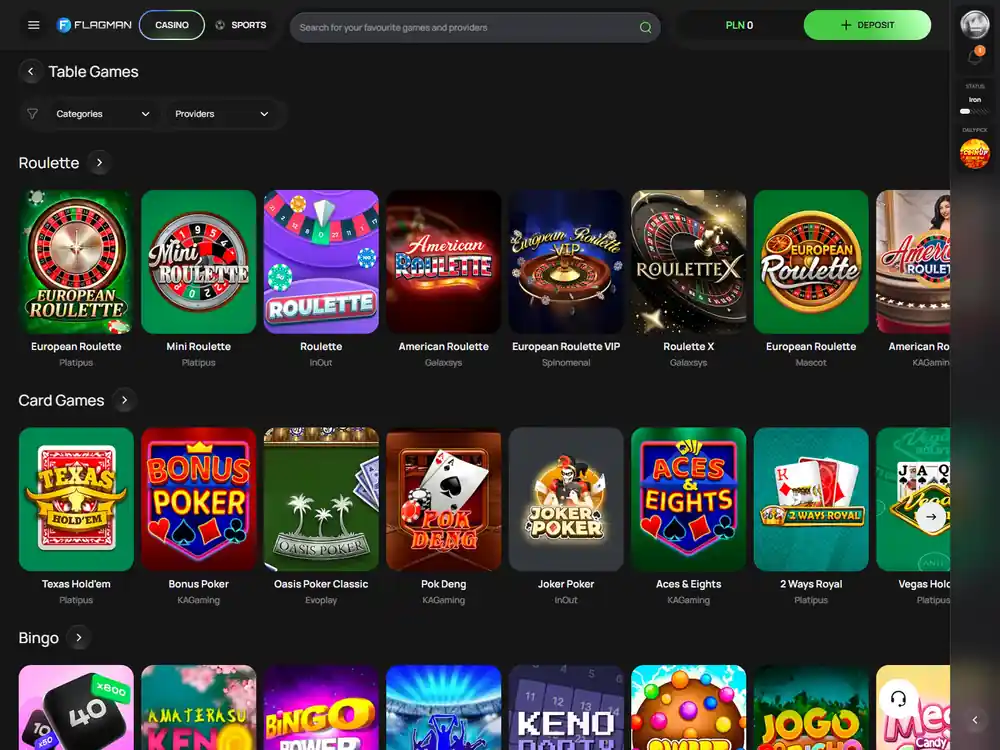
| Table Games category | Example card | What to look for |
|---|---|---|
| Roulette | European Roulette by Platipus | Wheel or game variant. The section also has American and Mini Roulette cards. |
| Card Games | Texas Hold'em by Platipus | The card format. Casino Hold’em and video poker results are also present. |
| Bingo | Bingo Power by Belatra | The actual format on the card. This shelf also carries Keno and lotto examples. |
| Scratch Games | Scratch Match by Evoplay | The specific scratch card and its available mode. Multiple studios appear in the row. |
In the Bingo row, Keno from 100HP Gaming and Sweet Lotto from Belatra sit alongside titles explicitly called Bingo. The shelf label helps you browse, and the individual card tells you which draw or game you have selected. In Roulette, check the provider even after choosing a wheel type. The European Roulette title appears from Platipus, Mascot, Spinomenal, KAGaming and Betsoft Gaming in the same row.
When to choose Live Casino
Go to Live Casino for the dealer stream and table-specific controls. It has separate groups for Live Games, Roulette, Blackjack, Game Show and Poker. Crazy Time from Evolution appears in Game Shows and Roulette 1 from Pragmatic Play Live appears in Roulette. Those examples help you distinguish the live route from the Table Games card selection.
Once you open a live card, check the table language as well as the game name. English-language and Russian-language variants appear in the live catalogue. The lobby tile identifies the table. Open the table to see which positions are free in that session and check its terms.
For a rising multiplier or a faster instant format, use Crash Games. The same group can include Aviator by Spribe, JetX by Smartsoft and a different format such as Chicken Road 2.0 by InOut. Choose by card and mechanics once you are in the section.
Demo, Real Money and access to the card
Check which modes the card offers, then check what opens in your session. The cash route and the demo route use separate balances.
Read the mode before opening the game
Demo opens a practice route when the provider permits it. A virtual balance labelled FUN is used inside that demo session. It does not form part of a PLN balance. Real Money identifies a cash-play route subject to the game, the account and applicable rules. Check the card’s available mode and the balance in use before going further.
A card can have both Demo and Real Money routes. The catalogue marks Demo on Flagman Fruits, Mummyland Treasures, Aviator and JetX. Some live cards carry Real Money and let you view the table as a separate action. Watching the stream and opening a virtual-credit game are different actions. For the guest route and what qualifies as a playable practice mode, see Demo Games.
The Polish catalogue can show a title before the provider authorises launch on that device or session. Provider rules, the active account and the country all matter. PLN identifies the currency context. Check the rules that apply where you are and the conditions on the specific card. A separate issue is balance eligibility. The casino bonus FAQ excludes bonus-funded bets on slots marked Real Money or Jackpot. Jackpot bets also do not count towards bonus wagering under the general bonus rules. Check the terms of your active offer before relying on any game for wagering.
Separate a card opening from a successful launch
I could see all four cards selected for the search-and-launch check. Three opened on the first attempt. An APK session lost connection before the fourth provider lobby was ready. After the connection returned, I retried and the card opened. The interruption happened after the catalogue had already found the card. If you reach a card and the provider screen stalls, check your connection and reopen that same card when the connection returns.
A separate Polish comparison set covered 76 distinct game IDs and 62 demo episodes. For Scratchy Mini by Hacksaw, the iPhone 17 Safari route opened the card before reaching an active demo screen in 5.00 seconds from the demo opening. Superb Keno by Amusnet, ID 307584, opened the cash screen through Android APK 1.1 in its eligible profile. The episode used 0 PLN because it stopped before a stake. These are separate outcomes, with the result attached to the exact game and mode.
Catalogue score and the best starting point
The catalogue scores 7.3/10 in the Polish profile. The strongest features are slot depth and filters, plus the ability to recover an exact card across desktop and Android searches. The narrower Crash Games filters give you less control, and each game or live table has its own access conditions. The scores below are the components of the catalogue result.
| Category | Weight | Score |
|---|---|---|
| Slots | 45% | 7.9/10 |
| Live Casino | 30% | 6.4/10 |
| Crash Games | 15% | 6.7/10 |
| Lobby and game discovery | 10% | 8.0/10 |
| Catalogue score | 100% | 7.3/10 |
See the Methodology for how category scores contribute to the result.
Start with the list that matches your purpose. Read the catalogue counts as measures of their own lists, choose Table Games for roulette, cards, bingo or scratch games in that shelf, and search by exact title and check the provider on the result when you know what you want. Check Demo or Real Money on the selected card. To browse by features and studios, go to Slots. For the wider product context, see the FLAGMAN Casino overview.
FAQ
Can I filter games by provider without entering a game name?
Yes. Open Providers and choose a studio in All Providers, or select Providers within the relevant category. The first route helps you browse a studio across the catalogue. The category filter narrows the list you already chose.
Why does Popular show a different number after I change a filter?
Popular:PL returned 63 positions in the PLN results, while the same currency without the regional filter returned 39. Check the currency and active region filter before comparing. The shorter row in Lobby is a separate display.
How do I pick the right game when the titles look the same?
Match the full name, including suffixes and numbers, then check the provider. Gates of Olympus 1000 and Gates of Olympus 2500 are separate results. Titles such as Mines also appear under multiple providers.
Where should I look for roulette with a dealer?
Open Live Casino and select Roulette to look for a streamed table. Check the live studio, language and available positions on that card. Use Table Games → Roulette to browse the separate selection of roulette game cards.
Can a listed demo fail to open?
Yes. The Demo label indicates the practice route associated with the card. The current device, session, provider rules and connection can affect whether it opens. If a provider screen fails to load, check your connection and the mode still offered on that card before trying again.