
Responsible Gambling at FLAGMAN Casino in Poland
Use the account’s Limits settings to cap spending or end a session when it reaches your time limit. If you need a formal break from gambling, ask FLAGMAN Casino support for temporary or permanent self-exclusion and keep its confirmation.

| Parameter | What to check |
|---|---|
| Age requirement | The editorial guide is for adults aged 18 and over. The operator requires 18 or the higher applicable minimum age and can ask for proof. |
| Spending and session limits | Set Deposit Limits, Loss Limits and Wager Limits by day, week or month. Use Session Limits to cap the time you spend in one session. |
| Where to set a limit | Open Limits in your account. Select the limit type and, where applicable, the period before entering the cap. |
| Reminders and breaks | Reality Check shows time spent and spending every 15, 30, 45 or 60 minutes. Contact support to arrange a formal break. |
| Self-exclusion and duration | Request a temporary or permanent account restriction. Check the period stated in support’s reply for a temporary restriction. |
| How to request self-exclusion | Contact the operator through Live Chat or email and keep its confirmation. |
| Marketing preferences | In Notifications, manage casino and sports promotions separately for email, text messages and browser notifications. |
| Help resources | BetBlocker for device blocking and Gamblers Anonymous UK for UK peer support. |
Age requirements and gambling risks
This guide is for readers aged 18 and over. The operator sets a minimum age of 18, or higher where required by applicable law. Registration asks you to confirm your age. The operator can ask for documents and suspend access while it checks eligibility. If the operator finds that a player is under the applicable minimum age, its policy says it will freeze the account and revoke all winnings.
Set aside only money you can afford to lose, and step away and seek help if you start chasing losses, borrowing money to gamble or missing work or family commitments.
If children use a shared device, use parental controls to restrict access to gambling sites and monitor how they use that device.
Set spending and session limits
Open Limits to choose the part of your gambling you want to control. A deposit cap limits the money you add to your account. A loss cap limits what you can lose over the chosen period. A wager cap limits the total amount staked over that period, including money you stake again.
Set a deposit, loss or wager limit
- Open your existing account and go to Limits.
- Select Deposit Limits, Loss Limits or Wager Limits according to what you want to cap.
- Select a day, week or month and enter the amount. On a PLN account, use a limit that fits the amount in złoty you can afford to lose over that period.
- Check the amount and period shown for the active limit before relying on it. Check both again after changing the limit.
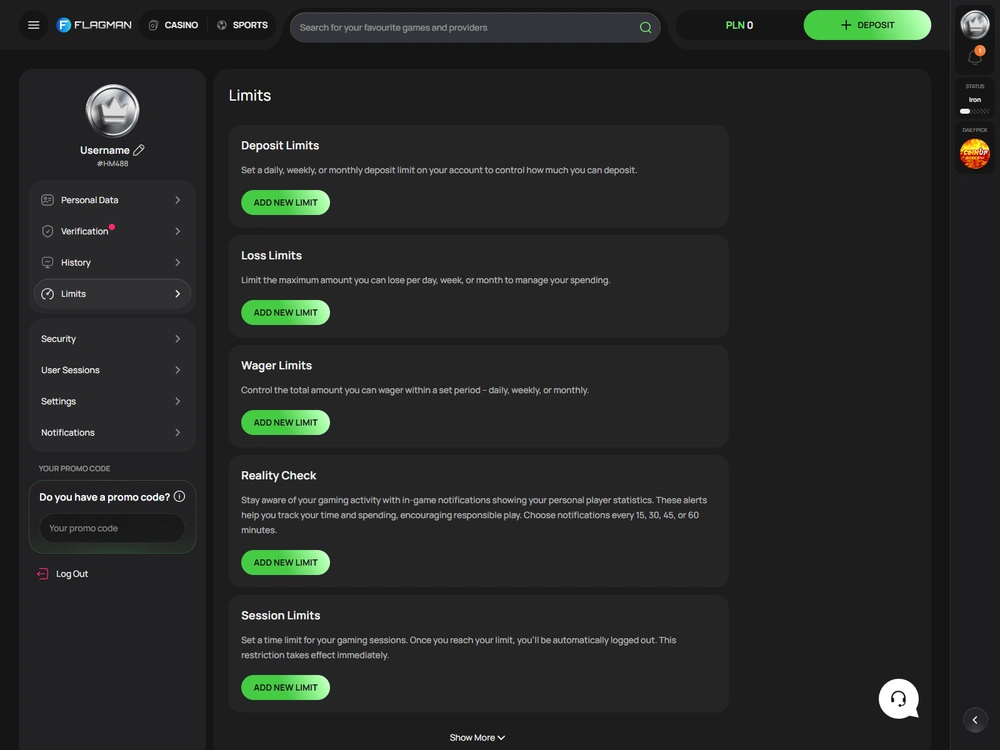
Choose the period that matches how you manage your budget. A weekly deposit cap can help you keep several smaller top-ups within one budget, while a wager cap addresses how much you stake across bets. Use History to check the underlying activity. My Transactions shows account movements, while Casino Bets and My Sports Bets cover the respective betting activity.
Set a reminder or a session limit
Reality Check displays time spent and spending.
- Open Reality Check under Limits.
- Choose a 15-, 30-, 45- or 60-minute interval.
Use that prompt to stop and check how the session fits the budget and time you set for yourself.
If you want the account to end play at a set point, choose Session Limits. The time limit applies immediately, and the account signs you out automatically when the limit is reached. For a break that restricts access to your account after the session, request a temporary restriction through support.
Request a break or self-exclusion
Contact operator support to request a temporary or permanent restriction on your existing account. Ask for the terms of the restriction in writing. The period for a temporary request is the one stated in the confirmation, and any return is governed by that period and the operator’s procedure.
- Open Live Chat or email [email protected]. Say that you want to request self-exclusion and specify whether you want it to be temporary or permanent.
- Check the reply for confirmation of the restriction and, if temporary, its period. Keep the response and any reference the operator provides.
- If access remains available or a requested limit fails, contact support promptly. Give the time and time zone, the status shown in your account and the earlier confirmation or reply. Ask for the case to be reviewed by the Customer Success Team.
Follow up in the same conversation or quote the earlier reference so support can connect the reports. The Customer Success Team handles the complaint and sends unresolved cases to the operator’s administration. See Support and Complaints for the operator’s escalation route.
Self-exclusion restricts access to the gambling account. The operator’s terms also provide for promotional messages to stop when support acts on a request to refrain from gambling. Account closure is a separate request that the operator accepts by email. If you specifically want a restriction to help you stop gambling, name self-exclusion in your message so support can confirm the measure you asked for.
Turn off gambling promotions
Use Notifications to turn off promotional messages by product and channel.
- Open your account and go to Notifications.
- Find Casino News & Promos and Sports News & Promos.
- Turn off the promotional notifications you want to stop under Email, Text Messages and Browser Notifications in each applicable group.
Transaction Notifications and System Notifications have their own groups, so you can keep alerts about account activity and security, including password changes, while turning off promotions. Transaction Notifications also include cashback and tournament reward alerts.
Get help with gambling harm
Use BetBlocker if you want an additional block on gambling access on a device. Gambling Therapy is an online support option listed in the operator’s policy. If gambling is causing harm, you can seek help while your account restriction is being arranged.
Gamblers Anonymous UK is a UK peer-support resource. GAMSTOP is a UK self-exclusion scheme. For the FLAGMAN Casino account in Poland, use the operator’s support route to request the account restriction.
Set limits or request self-exclusion. Open Limits for spending or session controls, or contact support for a formal account restriction.