
How to open FLAGMAN Casino demo games as a guest in Poland
Eligible slot demos open from the game card without an account or a deposit. Demo availability can vary by country, game, provider, device and session. Check the provider screen for a virtual balance and active controls. In my Flagman Fruits test, a fresh session restored the 1,000 FUN starting balance.
By Rafał Nowakowski · Published


| Feature | How it works |
|---|---|
| Demo access | Select Demo on an eligible game card. |
| Sign-in | Supported slot demos allow guest access. |
| Deposit | The guest demo requires no deposit. |
| Virtual units | FUN credits, or virtual amounts labelled EUR or USD on some provider screens. |
| Starting balance | Flagman Fruits started with 1,000 FUN. The Mummyland Treasures screen showed 100,000 FUN. |
| Session reset | Exit the Flagman Fruits demo and relaunch it from the card. A fresh session restored 1,000 FUN. |
| Game examples | Flagman Fruits and Mummyland Treasures slots, plus a separate Aviator crash demo. |
| Device and launch | Flagman Fruits opened on Samsung Galaxy S26+ in Android APK 1.1. |
| Stake and RTP | Flagman Fruits displayed a 0.60 FUN stake. Mummyland Treasures displayed a 100 FUN stake and 96.36% theoretical RTP. |
| Demo balance | Stakes and payouts stay in the virtual session. |
| Switching to real money | Exit the demo and select the real-money option on the card. Play requires game access, an account, a deposit and an eligible cash balance. |
Pros
- A guest can try supported slots without signing up or paying a deposit.
- Virtual credits let you inspect the controls, stake settings and features before deciding whether the game suits you.
- Starting a fresh Flagman Fruits session restored the same balance, which makes it possible to repeat the initial setup.
Cons
- Launch can depend on the game, provider, country, device and session, even when the card shows Demo.
- Virtual wins stay in the game. The cashier cannot redeem FUN.
- The stake range and game configuration can differ between modes, so check the parameters on the screen you plan to use.
Games at FLAGMAN Casino














How to find FLAGMAN Casino demo games in the catalogue
Search Casino or Slots by game title, then open the card and select Demo. If you are looking for FLAGMAN Casino demos without registration, use a supported slot card and check that it opens a playable provider session while you are still a guest.
- Open Casino or Slots and select the search field.
- Enter the full game title. For Flagman Fruits, check that the card identifies BGaming. Use Providers to narrow the list when several results look similar.
- Open the card and select Demo. If the card offers a separate real-money route, stay on the demo option for virtual play.
- Wait for the provider screen to finish loading. Check the balance and stake fields, then look for an active Spin button or the equivalent control for that game.
Finding the exact game card
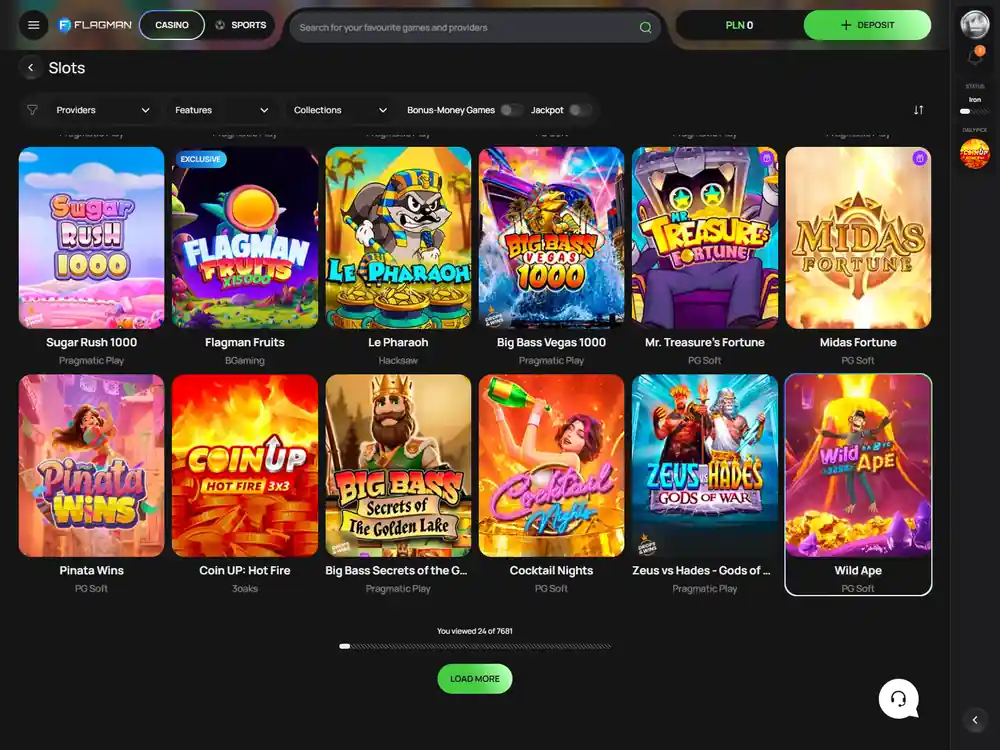
Compare the complete title and provider to find the exact game card. I reached the BGaming Flagman Fruits card in three actions on desktop Chrome, 6.4 seconds after opening the global search. The Android search returned the same card. A suffix can identify a different version with its own rules and launch options.
The slot catalogue is a starting point for finding FLAGMAN Casino demo games. A card can appear before a provider opens the session. If the game stalls on a loading screen after your connection drops, restore the connection and reopen the card. In a separate Android attempt, the provider lobby loaded after the connection returned. The launch still depends on the card and the access available to your profile.
Examples of games with a playable demo
Flagman Fruits, Mummyland Treasures and the other slots below reached playable provider screens. In a separate check under a Polish profile set to PLN, 76 different game cards were checked and 62 separate demo sessions were opened. These counts describe the games selected for that check and the access available during those sessions.
| Game | Provider | Example from the demo |
|---|---|---|
| Flagman Fruits | BGaming | 1,000 FUN to start, 0.60 FUN per spin. The feature screen shows 10 free spins and a Bonus Buy option. |
| Mummyland Treasures | Belatra | The game screen shows 100,000 FUN and a 100 FUN stake. The game has 2,187 ways. The opening screen displays a theoretical RTP of 96.36%. |
| Le Pharaoh | Hacksaw Gaming | Virtual EUR 5,000 balance and EUR 2 stake. Golden Squares and the bonus choices appear in this game’s rules. |
| Le King | Hacksaw Gaming | Virtual EUR 5,000 balance and EUR 2 stake. The feature descriptions include Neon Rainbows and progressive Golden Squares. |
| Das xBoot Zwei! | Nolimit City | Virtual EUR 10,000 balance and EUR 1 stake. The introductory screen labels its volatility Extreme. |
| Hot Fiesta | Pragmatic Play | Virtual USD 100,000 in credits and a USD 2 stake. The game shows Autoplay and medium volatility. |
| Bullies Shooters | Zillion Games | The game shows 1,024 ways and describes the Mystery symbol and respin feature. |
| Book of Ra Magic | Novomatic 2 Games | Virtual EUR balances of 100,000 and 99,999, a EUR 1 stake and Hold to start autoplay. |
A label, a launch response and a playable screen
Check the provider screen for a working game control and a virtual balance to tell when a demo is ready. Mummyland Treasures, The Dog House, Lucky Barrel Tavern, Hot Fiesta, Le Pharaoh, Das xBoot Zwei! and Bullies Shooters returned demo launch responses in the browser. The catalogue entries for Duel at Dawn, Flagman Fruits, Le King and Book of Ra Magic carried a demo flag.
Le Pharaoh and Le King illustrate why the full title matters. Their EUR amounts matched. The feature menus describe different mechanics. The catalogue displays Das xBoot Zwei! as Das xBoot 2wei!. The original Das xBoot is a separate entry. Use the provider name and matching title if the catalogue and game screens spell a sequel differently.
Crash games and live tables
Aviator had both Demo and Real Money markers in the crash catalogue. Its separate demo reached an active screen in 6.80 seconds in Safari 26.0 on an iPhone 17. In that session, 32 rounds at 0.80 FUN left 998.46 FUN from a 1,000 FUN starting balance. The same catalogue also showed Demo and Real Money markers for JetX and Chicken Road, so check which mode you open on each card.
Live-table viewing has its own route. Crazy Time and Lightning Roulette were marked RM, meaning real money. Watching an open stream can show how a table works. To play with virtual credits, look for a playable Demo in the card itself. The Evolution Speed Roulette card in the Polish catalogue did not carry a Demo mark.
Virtual balances, session resets and real money
The balance you see in FLAGMAN Casino demo games belongs to the mode you opened. FUN is virtual, and the EUR or USD labels in the provider demos above also represent trial credits. The same currency symbols can appear on other screens. Use the mode and balance indicators together to tell whether the game is using trial credits or an eligible cash balance.
Read the stake settings for the version on screen
The 100 FUN display in Mummyland Treasures was the selected stake. The base-spin range in the checked demo configuration was 50–750 FUN. At that 100 FUN setting, the separate +25% feature increased the cost of a spin to 125 FUN. The provider describes Free Games appearing twice as often with that feature enabled.
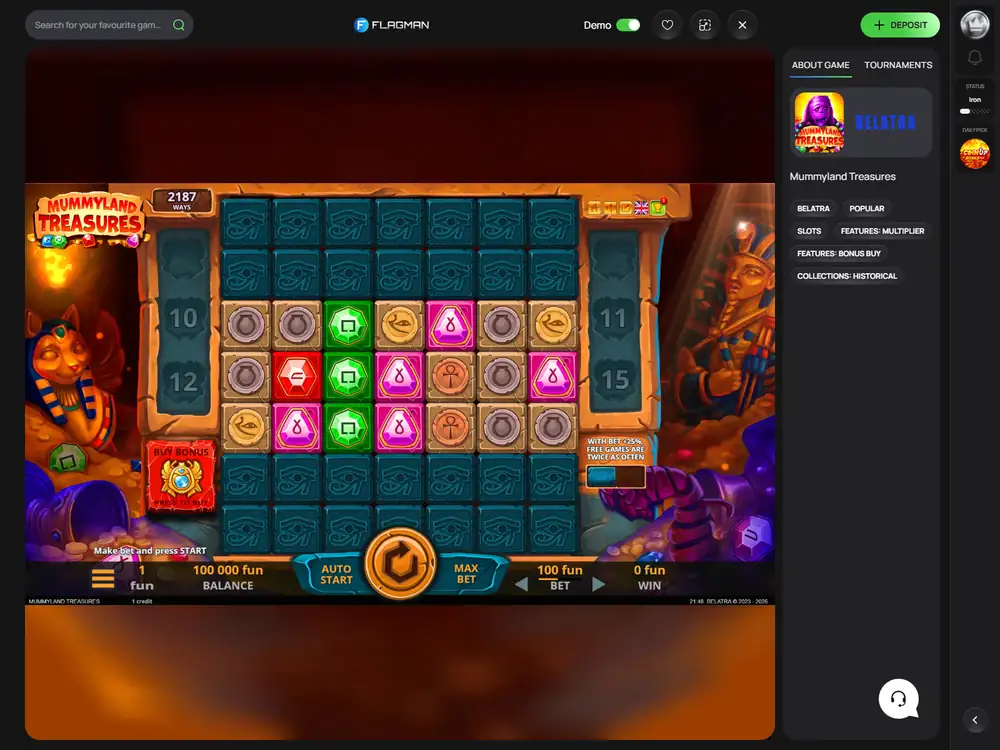
The Buy Bonus option had a different cost. Its price was 87 base stakes, or 8,700 FUN at the same setting. The base stake, the higher-stake toggle and the bonus purchase therefore draw different amounts from the virtual balance. Check the confirmation amount before selecting a feature.
The 96.36% listed for Mummyland Treasures is the theoretical return of the demo configuration shown on that opening screen. A separate configuration of the game uses 95.90%. Where a game lists RTP, use the figure for the exact version you are looking at. In a short trial you can observe the controls and the credits returned by those rounds.
Start a fresh Flagman Fruits session
Close the provider’s demo and launch a new session if you want to return to the starting amount observed in Flagman Fruits.
- Exit the provider’s game screen.
- Reopen the same Flagman Fruits card and select Demo again.
- Check the balance as soon as the new game screen opens. A fresh session in my test showed 1,000 FUN.
I could resume with the existing virtual balance while the same session remained active. If you return and still see your previous balance, you may have resumed the original game. Follow the same check for any other game you try, since reset behaviour belongs to its provider and session.
My Flagman Fruits demo on Android
I opened Flagman Fruits from the FLAGMAN lobby in the Android APK 1.1 and used the demo in Poland. I started with 1,000 FUN and kept my stake at 0.60 FUN for 60 spins over 6 minutes and 48 seconds. I left automatic bonus purchase and the stake-increase option off, which kept the stake constant for the series.
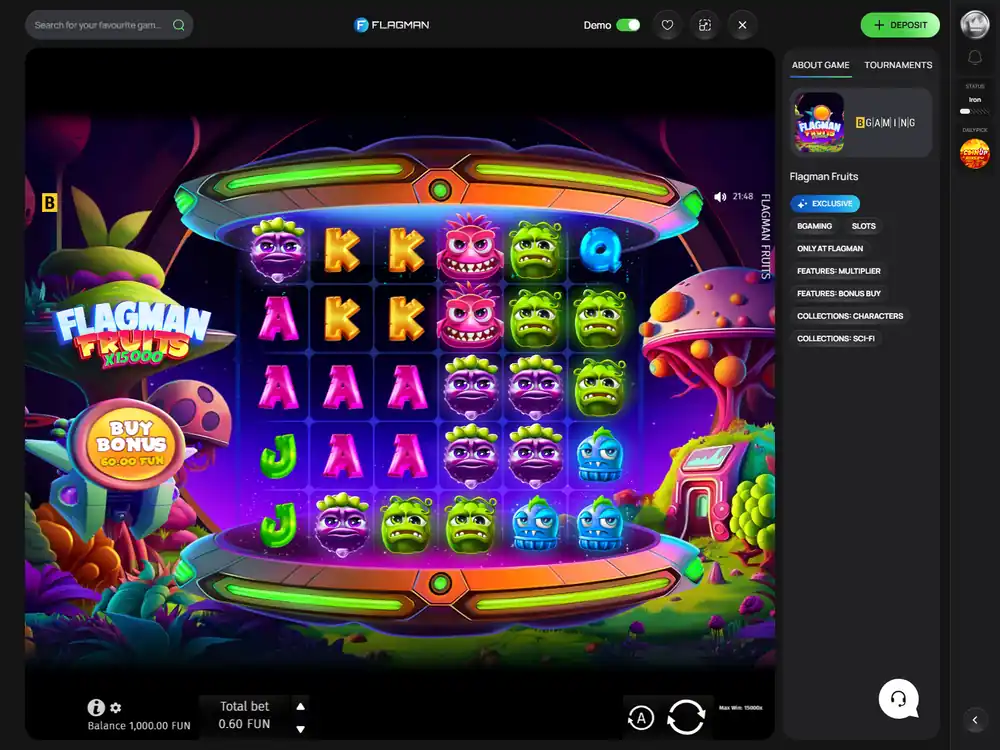
Fourteen spins returned credits. Nine paid more than the 0.60 FUN stake, and the biggest single payout was 7.20 FUN. I saw one bonus event. That split matters because a spin can return credits while still costing more than it pays.
- Total staked 60 × 0.60 FUN = 36 FUN.
- Total returned 31.50 FUN, including every credit payout from the series.
- Balance change −4.50 FUN, leaving 995.50 FUN from the starting 1,000 FUN.
- Return for the series 31.50 FUN divided by 36 FUN = 87.50%.
The 87.50% figure describes the payouts from those 60 demo spins. Theoretical RTP describes a game configuration over a much larger number of spins. To compare the settings of two versions, use the theoretical figure shown for each version.
I timed the launch separately on a Samsung Galaxy S26+ running APK 1.1 over 5 GHz Wi-Fi. The spin button became active 3.75 seconds after I selected Demo. That measurement ends at a playable game screen. The earlier Chrome search measurement ends at the game card.
Before you switch modes
Real-money play opens through its own option on the game card. The operator requires an account and a deposit for real-money play. The card also needs to be available for your profile, and stakes use the eligible cash balance for that session, such as PLN on a Polish cash profile. Check the stake and game rules on the money screen itself. FUN remains in the demo.
The Casino Game Catalogue explains how to search by game title and use the separate provider filter.
Frequently asked questions
Can I try a slot as a guest in Poland?
Yes. Eligible slot demos allow play without registration or a deposit. Open Demo on the game card and check that the provider loads a virtual balance and active controls. Access depends on the game, provider, country, device and session.
Why does a demo ask me to sign in?
The real-money route requires an account. If Demo asks you to sign in, check whether the provider offers guest access for that game in your country and in the current session.
Can I withdraw EUR or USD from a demo balance?
No. Amounts displayed as EUR or USD in a demo are trial credits, just like FUN. They stay in the provider’s virtual session. A bonus offered without a deposit is a separate offer with its own terms.
Will the demo balance carry over when I reopen a game?
It can carry over when the original session is still active. In Flagman Fruits, continuing the same session kept the remaining FUN. Opening a fresh session restored 1,000 FUN.